
Compass: Real Estate & Homes
Compass Inc.House & Home
4.5139.00 Reviews
- Version
- 26.34.0
- Installs
- 100.00K
- Age Rating
- Everyone
Screenshots

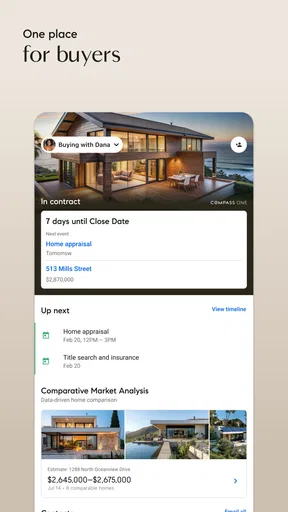


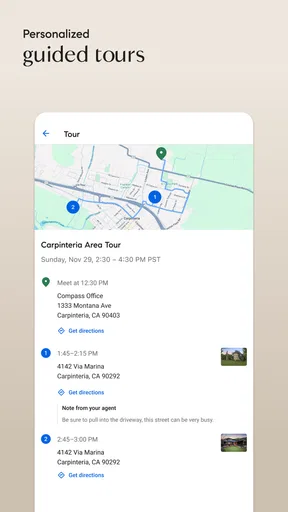
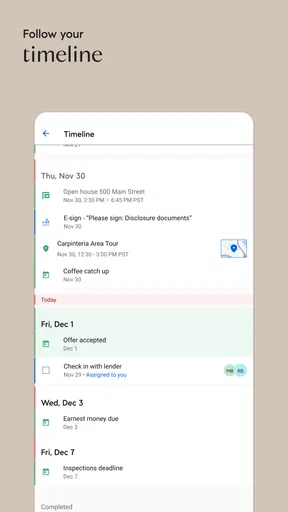
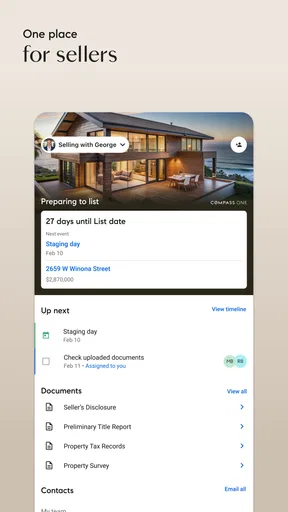

Our Review of Compass: Real Estate & Homes
 Analysis by Appyee
Finding a home is rarely a single search. I usually move between saved listings, neighborhood research, questions for an agent, and the practical work of deciding whether a property fits my budget and routine. Compass: Real Estate & Homes is built around that process. It is a free House & Home app from Compass Inc. that brings buying, selling, and apartment renting into one mobile experience, with Compass real estate agents as part of the wider service.
After using it as a browsing and decision-making tool, I found its biggest strength is not simply showing properties. It is helping turn a vague search into a more organized shortlist. The app feels most useful when I already know roughly what I want and need a convenient way to compare homes, revisit possibilities, and move from online research toward a conversation with an agent. It is less convincing as a complete replacement for every part of the property process.
How I use Compass from the first search to a realistic shortlist
My usual starting point is broad rather than overly precise. I look through homes or rentals in the area I am considering, then narrow the results according to the things that would genuinely change my decision: location, property type, price range, and the basic features I need. This is more effective than trying to create a perfect search immediately, because an overly narrow filter can hide useful alternatives before I understand the local market.
The practical habit I recommend is to separate “interesting” from “realistic.” I save properties that catch my attention, but I do not treat every saved home as a serious candidate. A second pass is where I check whether the location works for commuting, whether the layout suits daily life, and whether the listing deserves a question for an agent. This prevents the familiar problem of collecting attractive listings without making progress.
For a renter, the workflow can be quick. I might browse apartments during a lunch break, save a few that appear suitable, and return later when I can compare them calmly. For a buyer, the same process becomes more deliberate: I look at the surrounding area, compare similar homes, and keep notes about what makes each property worth investigating. The app is particularly convenient for this repeated checking because a phone is often the device I have with me when an idea about moving suddenly becomes practical.
For sellers, the value is different. The app is not just a window onto other homes; it can help someone understand how their property appears beside nearby listings. Looking at comparable homes gives useful context before speaking with an agent, although online impressions should not be mistaken for a professional valuation. A listing that looks similar on a screen may differ in condition, exact position, renovation quality, or other details that are difficult to judge remotely.
The most useful baseline habit is to treat the app as a decision workspace, not a property catalogue. I save fewer homes, revisit them with a specific question in mind, and use the resulting shortlist to guide the next conversation. That approach makes the experience less distracting and gives each saved listing a purpose.
What I check before trusting a listing
Photos are naturally the first thing that draws attention, but they are also where I am most careful. A polished set of images can make a room feel larger or brighter than it will in person. I look for practical clues instead: window placement, storage, the relationship between rooms, signs of awkward circulation, and whether the images show enough of the property to understand its shape.
I also read the listing details slowly instead of relying on the first impression. If a home seems perfect, that is exactly when I look for details that could change the decision. A property can be attractive yet unsuitable because of its location, access, layout, or the everyday compromises that do not stand out in a photo gallery.
When I compare several homes, I use the same questions for each one. How would I get to work or school? Where would ordinary shopping happen? Is the space useful for the way I actually live, rather than for the way the photos are staged? Would I still like the property if I removed the most impressive room from the presentation? This simple checklist is more valuable than repeatedly scrolling through the same images.
The app also works better when I distinguish between information I can inspect myself and information that needs an agent’s help. I can compare visible characteristics and organize candidates, but questions about availability, timing, negotiations, or the precise condition of a property deserve direct clarification. That division keeps the app useful without asking it to answer questions it cannot settle through browsing alone.
Settings and search choices worth reviewing
I would not begin by adjusting every available search option. Instead, I set the location and broad requirements first, then refine only when the results reveal a real problem. If the list is too large, I tighten the criteria. If it becomes too small, I loosen one requirement at a time so I know what trade-off I am making.
This matters because property searches often contain hidden compromises. Someone may insist on a particular number of rooms, only to discover that a slightly different layout offers a better location. Another person may focus on a maximum price while overlooking the cost of distance and travel. By changing one search choice at a time, I can see whether I am protecting a genuine need or simply filtering out homes that deserve a closer look.
I also review notification and account behavior before relying on the app for an active search. The right approach depends on how urgently I am moving. During casual research, I prefer not to let every new possibility interrupt my day. During a serious search, timely awareness can matter more, so I check the app regularly and keep my saved list current. The important point is to choose a routine deliberately rather than assume that more alerts automatically mean better results.
Location access is another choice I consider carefully. A property app can be convenient when I want to explore an area around where I am, but I do not need to make every search dependent on live location. Entering a neighborhood or area manually can be more intentional, especially when I am comparing several places or planning a move to somewhere I do not currently visit often.
My advice is to check the account and contact steps before you become emotionally attached to a property. If you expect to contact a Compass agent, make sure your profile and preferred communication details are comfortable for you. That small preparation reduces friction when a listing moves from “maybe” to “I need an answer about this today.”
Shortcuts that make repeated browsing less tiring
The fastest users are not necessarily the people who scroll most quickly. They are the people who repeat a clear process. I use one pass for discovery, one pass for elimination, and a final pass for questions. During discovery, I save possibilities without overthinking every detail. During elimination, I remove homes that fail a basic requirement. During the final pass, I decide what information I still need.
This three-pass method prevents a common waste of time: reopening the same listing repeatedly without learning anything new. It also makes saved homes easier to discuss with another person. Instead of saying that several properties “look nice,” I can explain why each one remains under consideration and what could remove it from the list.
A second useful pattern is to search by area before searching by fantasy. I may begin with a neighborhood that fits my daily route, then examine the available homes there. This produces a more grounded shortlist than starting with an ideal interior and discovering later that every suitable property is inconveniently located. For renters especially, the location-first approach can expose the real balance between space, access, and price.
When I am helping someone else search, I avoid sending a large stream of listings. I send only the strongest candidates and explain the reason for each. That keeps the discussion focused and makes it easier to notice different priorities. One person may care about a quiet street, while another cares about a flexible layout or a short journey. The app supports the browsing, but the quality of the decision still depends on how thoughtfully the shortlist is shared.
I also revisit saved homes after a pause. A listing that looked exciting late at night may seem ordinary the next morning, while a less dramatic property may continue to make sense. This is a surprisingly effective way to reduce impulse decisions. The app makes it easy to return to possibilities, but the discipline of waiting is mine.
Where the app helps experienced users, and where it stops
With an average rating of 4.5 from around 900 ratings and over 100,000 installs, Compass has clearly attracted a meaningful audience without feeling like an obscure experiment. It is rated for Everyone, which fits its broad purpose: browsing homes and rentals is relevant to many adults and households, even though the actual decisions can be financially serious.
The app runs on Android devices using version 6.0 or later, and its current version is 26.34.0. That makes device compatibility worth checking before installing on an older phone. In everyday use, I would also keep the operating system and app updated where possible, because property browsing depends on a smooth interface and reliable loading more than on elaborate technical features.
Compass was released on February 13, 2019, and the developer is Compass Inc. Its age suggests an established product rather than a brand-new listing, but I still judge it by the quality of my current workflow rather than by how long it has existed. A mature app can be useful and familiar while still having moments where navigation, loading, or listing details require patience.
The largest limitation is that a mobile listing cannot replace an inspection or a complete professional conversation. Photos and descriptions help me decide what deserves attention, but they do not reveal every noise issue, maintenance concern, neighborhood change, or practical inconvenience. Even a detailed listing remains a starting point. I would never use the app alone to make a final purchase or rental decision without verifying the important facts through the appropriate people and documents.
Another limitation is emotional overload. The convenience of having many homes available can encourage endless browsing, especially when I am not yet ready to move. If I am only daydreaming, the app can become a source of comparison rather than a useful planning tool. In that situation, a simple notes app or a general property website may be enough for occasional research, while Compass becomes more valuable once I have a defined area and a reason to contact an agent.
It is also not automatically the best choice for every market or every user. If I need a very specialized property, a broad local marketplace may offer more relevant inventory. If I want a completely self-directed process with no interest in agent support, I may prefer a service designed around direct owner communication. Compass makes the most sense when its agent-centered path fits the way I want to buy, sell, or rent.
Who should install it and who should skip it
I would recommend Compass to someone who wants a clean starting point for a serious home search and appreciates having a route from browsing toward professional assistance. It is also useful for people who move between short sessions: checking listings on a commute, saving possibilities at home, and returning later to compare them. Sellers can use it to understand the visible landscape around their property before discussing next steps.
I would be more cautious recommending it to someone who wants only private, informal browsing with no intention of engaging an agent. I would also suggest looking elsewhere if the app’s available homes do not match the specific region or property niche being searched. No single real estate app can guarantee that its inventory will suit every local market, and the right alternative may be a local service, a direct-rental platform, or a broader property marketplace.
For a first-time renter, I would use Compass alongside a written moving checklist. The app can organize the search, but I would separately track viewing questions, application requirements, move-in timing, and recurring costs. For a buyer, I would keep a comparison note outside the app so that saved listings are judged by the same criteria rather than by whichever one has the most appealing photographs.
My verdict after building a repeatable routine
Compass: Real Estate & Homes is at its best when I use it with a plan. Its free price removes an obvious barrier to trying it, and its focus on buying, selling, and renting gives it a clear role in the early and middle stages of a property search. I like the way it can turn scattered browsing into a shortlist that leads to better questions.
I would not call it a substitute for agents, viewings, inspections, or careful financial planning. Its value is earlier in the process: discovering possibilities, comparing them, and deciding which ones deserve time. That distinction is important. Someone expecting the app to complete the entire transaction may find the experience incomplete, while someone using it as an organized bridge between curiosity and action will get much more from it.
My final recommendation is to install it if you are genuinely exploring a move, then give yourself a simple rule: save with a reason, revisit with a checklist, and contact an agent only after you know what you need to ask. That habit keeps the app from becoming an endless stream of attractive homes. Used that way, it is a practical companion for making a property search more focused and less overwhelming.
Verdict
Strengths of Compass: Real Estate & Homes
- Detailed property listings with photos, prices, and key home information.
- Useful search filters help narrow results by location, price, and property type.
- Map-based browsing makes it easy to explore homes in preferred neighborhoods.
- Saved searches can help track new listings matching your requirements.
- Convenient contact options let users connect with agents or listing providers.
Limitations of Compass: Real Estate & Homes
- Some listings may be outdated or unavailable when you open them.
- Search results can vary significantly depending on the local market.
- Certain property details may be incomplete or require agent confirmation.
- Frequent notifications may feel excessive if alerts are not customized.
- The app is less useful in areas with limited listing coverage.
Similar Picks in This Category
View All
Universal TV Remote Control
CodeMatics Media Solutions3.9

AlfredCamera Home Security app
Alfred Systems Inc.4.7

Planner 5D: AI Home Design
Planner 5D4.5

Universal Tv Remote-Cast to TV
One Music Player4.1

Zillow: Homes for Sale & Rent
Zillow Group4.8

99acres Buy/Rent/Sell Property
infoedge.com4.3
Frequently Asked Questions
What is Compass: Real Estate & Homes used for?
Compass: Real Estate & Homes is a property-search app for browsing homes, apartments, condos, and other real estate listings. You can search by location, price, bedrooms, property type, and other filters, then view photos, descriptions, and listing details. It is designed to help buyers and renters discover properties and connect with real estate professionals.
Can I search for homes to buy or rent with the Compass app?
Yes, the app supports both property purchases and rentals, although availability can depend on the market and the listings provided in your area. You can enter a city, neighborhood, ZIP code, or map location and narrow the results using filters such as budget, number of bedrooms, bathrooms, square footage, and listing status. Always confirm current availability before making plans.
Does Compass: Real Estate & Homes show accurate and up-to-date listings?
Compass listings generally include useful information such as pricing, photographs, property descriptions, status updates, and contact details. However, real estate information can change quickly, and a home may be pending, sold, rented, or have a modified price before the app reflects the update. Treat the app as a discovery tool and verify important details with the listing agent.
Can I contact a real estate agent through Compass?
The app is built to help users connect with Compass agents and request more information about properties. Depending on the listing, you may be able to send an inquiry, schedule a showing, or ask questions directly from the property page. You should expect to provide contact information, and response times may vary depending on the agent, location, and inquiry volume.
Is Compass: Real Estate & Homes free to download and use?
The app is generally available to download and use without an upfront fee for browsing real estate listings. Nevertheless, using the app does not remove the normal costs associated with buying or renting a property, such as deposits, commissions, inspections, closing costs, or application fees. Review the app store requirements and Compass privacy settings before creating an account or submitting personal information.
